
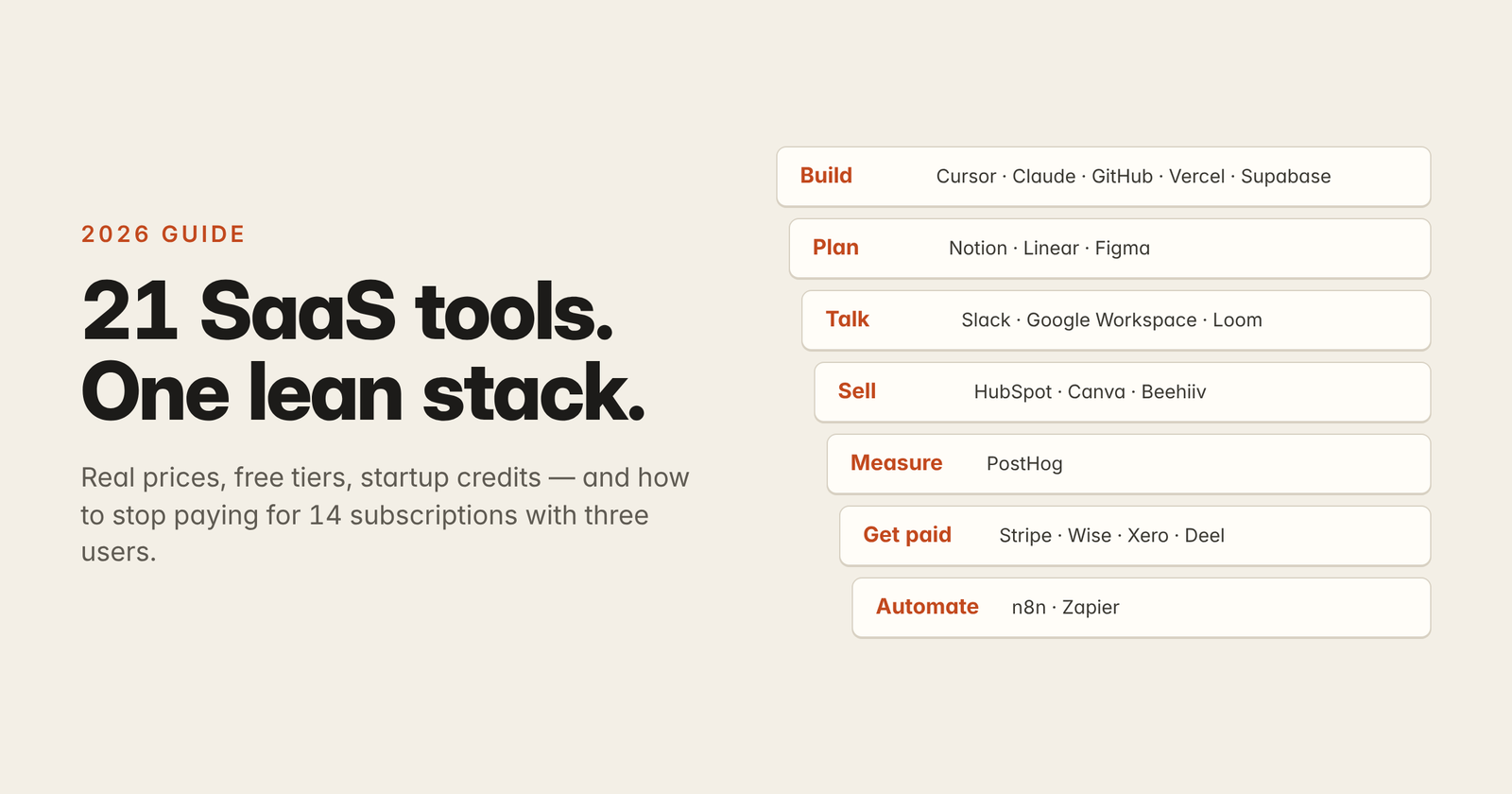
Your startup has three users, zero revenue, and somehow 14 subscriptions. That’s not a tech stack, that’s a monthly tax on your runway.
This guide breaks down the SaaS tools for startups that are actually worth paying for in 2026, sorted by the job they do and the stage you’re at.
You’ll get real 2026 prices, the free tiers that carry you surprisingly far, the startup credit programs most founders never claim, and a simple system to keep your stack lean as you grow.
One rule first: you’re not buying apps, you’re hiring software for specific jobs. No job, no seat.
⚡ Key Takeaways
- Start free, upgrade on pain. Most SaaS tools for startups have free tiers that last months. Upgrade only when a limit blocks real work.
- One tool per job. Build, plan, talk, sell, measure, get paid, automate. Duplicates are where SaaS budgets quietly leak.
- Claim startup credits early. AWS, Google Cloud, HubSpot, and PostHog all run startup programs, but every credit has an expiry date.
- Plan for the “credit cliff.” Your real SaaS bill shows up when credits and year-one discounts run out. Budget for that month now.
- Audit every quarter. A 30-minute review of seats and usage saves more money than any discount code.
What Are SaaS Tools for Startups?

SaaS tools for startups are cloud-based software products, paid by subscription or usage, that let a small team handle product development, communication, sales, analytics, billing, and operations without buying servers or building internal tools.
The best ones have generous free tiers, clean integrations, and pricing that scales with your growth instead of punishing it.
In 2026, AI is baked into almost every tool, from notes to issue tracking. That’s mostly great, but it also means usage-based charges hiding behind the seat price.
The smart move is to think in jobs to be done: build, plan, communicate, sell, measure, get paid, and automate. Pick one strong tool per job and you’re done.
How to Choose SaaS Tools for Startups
The fastest way to choose is to run every tool through three questions: does it own a job nobody else in your stack owns, can you leave easily, and does the price still make sense at 10x your team size? If a tool fails any of these, skip it.
1. Does it own one clear job? If Notion already holds your docs and wiki, you don’t need a second wiki app. Overlap is the number one cause of SaaS sprawl in small teams.
2. Can you export your data? Check for CSV export, a real API, or standard formats. Lock-in feels fine until you need to migrate in a hurry, and then it’s giving hostage situation. 😬
3. How does pricing scale? Per-seat pricing grows with every hire. Usage-based pricing grows with every customer. Know which one you’re signing up for before you sign.
The 21 Best SaaS Tools for Startups in 2026
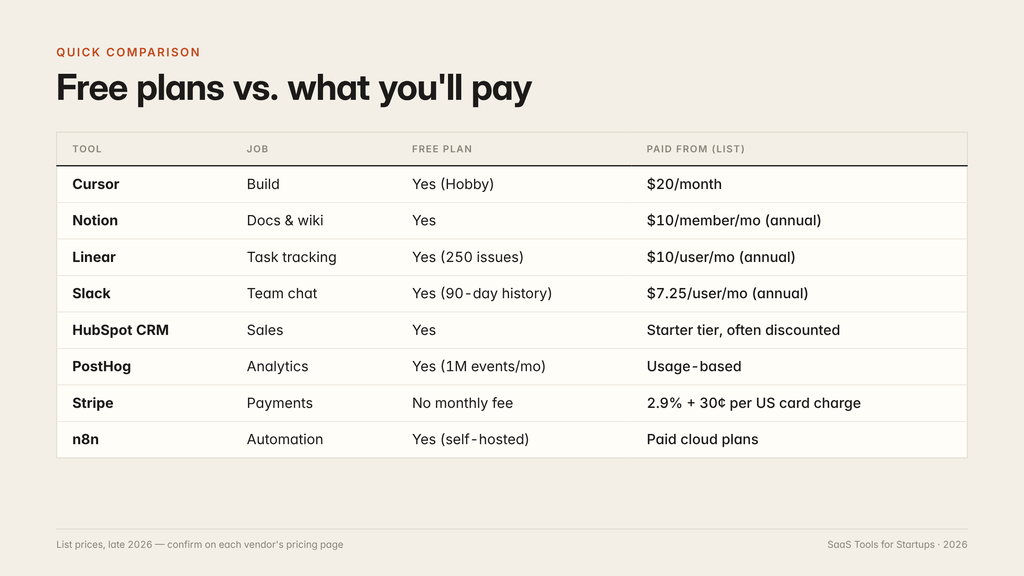
These 21 SaaS tools for startups cover the seven core jobs, and almost every one has a free tier or pay-as-you-go option. Prices below are list prices checked in late 2026, so confirm on each vendor’s pricing page before you buy.
Cursor, Claude, GitHub, Vercel, Supabase
Building is where AI changed SaaS tools for startups the most. Small teams now ship MVPs in weeks, not quarters.
- 1. Cursor — An AI-native code editor. Pro is $20/month, with Pro+ at $60, Ultra at $200, and Teams at $40/user/month. Paid plans run on a usage pool, so heavy use of premium models can cost extra.
- 2. Claude — An AI assistant for writing specs, debugging, research, and drafting docs. Claude Code also works as an agentic coding tool in the terminal.
- 3. GitHub — Code hosting, pull requests, and CI with GitHub Actions. The free plan covers most early teams.
- 4. Vercel — Frontend hosting and deployments with a free Hobby tier. Push to Git and your app goes live in minutes.
- 5. Supabase — A Postgres database with auth, storage, and APIs built in. The free tier is plenty for an MVP.
If you’re learning to build while you build, our guide on learning software engineering in the AI era covers how to use these tools without skipping the fundamentals.
Notion, Linear, Figma
Planning apps are the SaaS tools for startups that teams over-buy most. Keep it to one docs tool and one task tool, max.
- 6. Notion — Docs, wikis, and lightweight databases. Free for individuals, Plus is $10/member/month billed annually ($12 monthly), and Business is $20 billed annually. Full Notion AI now sits on Business and Enterprise, while Free and Plus only get a limited trial.
- 7. Linear — Fast, keyboard-first issue tracking for product teams. Free covers 2 teams and 250 issues, Basic is $10/user/month, and Business is $16/user/month, both billed yearly.
- 8. Figma — Design, prototyping, and whiteboarding. The free starter plan works for early mockups and user flows.
Slack, Google Workspace, Loom
The best communication SaaS tools for startups cut meetings, not add them. Async is the productivity cheat code.
- 9. Slack — Team chat. The free plan keeps 90 days of message history and allows 10 app integrations. Pro is $7.25/user/month billed annually or $8.75 monthly.
- 10. Google Workspace — Domain email, Calendar, Drive, and Meet. A custom domain email also helps with startup program applications.
- 11. Loom — Quick screen recordings for demos, bug reports, and updates. One 3-minute video can replace a 30-minute call, fr.
Async habits matter as much as the tools. Our post on chat dots is a good read on why always-on chat quietly kills deep work.
HubSpot, Canva, Beehiiv
Your sales and marketing SaaS tools for startups need to do three things: track leads, make assets, and build a channel you own.
- 12. HubSpot CRM — The free CRM is a solid starting point for tracking contacts and deals. The HubSpot Starter Customer Platform bundles marketing, sales, and service tools, and HubSpot regularly runs discounts on it.
- 13. Canva — Social graphics, pitch visuals, and ad creatives. The free plan is enough to start.
- 14. Beehiiv — Newsletter platform with growth tools. An email list is the one audience no algorithm can take from you.
Want scroll-stopping launch videos without a design team? Check out how to make motion graphics with Claude.
PostHog
- 15. PostHog — Product analytics, session replay, feature flags, and surveys in one platform. The free tier includes 1 million events and 5,000 session recordings every month, and PostHog’s usage pricing only kicks in past that.
One analytics tool is enough at the start. Running three dashboards that disagree with each other is mid.
Stripe, Wise Business, Xero, Deel
- 16. Stripe — Payments, subscriptions, and invoicing. Stripe’s standard pricing in the US is 2.9% + 30¢ per successful domestic card charge, with no monthly fee. International cards add 1.5%, and currency conversion adds 1%.
- 17. Wise Business — Multi-currency accounts for paying and receiving money across borders, useful for global teams and customers.
- 18. Xero — Cloud accounting with bank feeds and invoicing, widely supported by accountants worldwide.
- 19. Deel — Contracts, payroll, and compliance for hiring contractors and employees in other countries.
Quick fee math: a $50 sale on Stripe costs you $1.75 in fees (2.9% × $50 + $0.30). On a $10 sale, the same 30¢ makes the fee about 5.9%, which is why low-priced plans hurt margins.
n8n and Zapier
- 20. n8n — Workflow automation with AI agent nodes. You can self-host the community edition or use the paid cloud version.
- 21. Zapier — The easiest no-code automation tool, with thousands of app integrations and a free plan for simple workflows.
Automation is where a 3-person team starts acting like a 10-person team. Start with one painful workflow, like routing signups into your CRM and Slack. 🤖
Quick Comparison Table
The Best SaaS Stack for Each Startup Stage
Your stack of SaaS tools for startups should match your stage: run on free tiers before revenue, pay for collaboration once you have paying customers, and add admin, security, and AI tiers only when you’re scaling a team. Upgrading early is just paying for problems you don’t have yet.
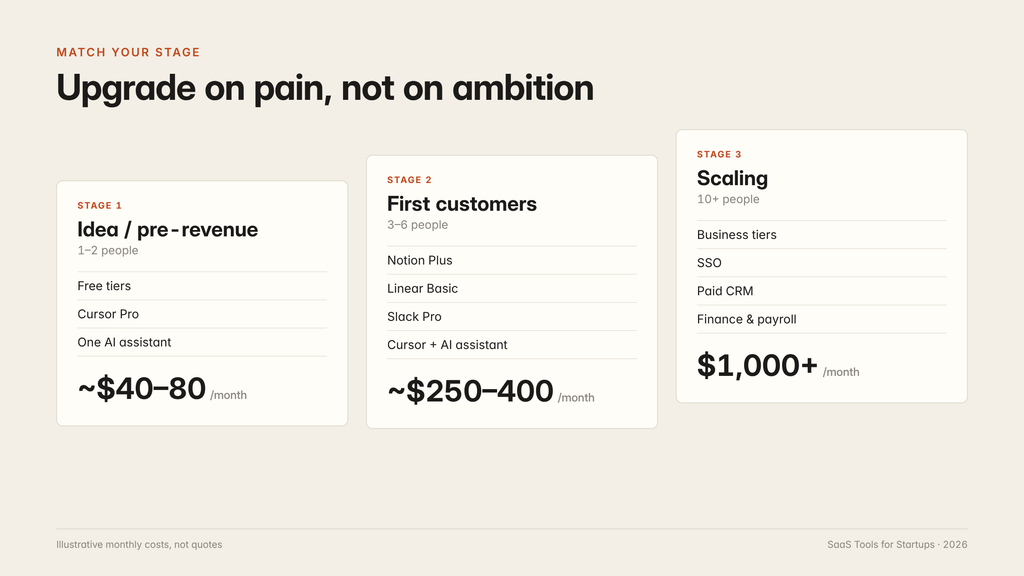
| Stage | Team size | Typical stack | Illustrative monthly cost |
|---|---|---|---|
| Idea / pre-revenue | 1–2 | Free tiers + Cursor Pro + one AI assistant | ~$40–80 |
| First customers | 3–6 | Notion Plus, Linear Basic, Slack Pro, Cursor, AI assistant | ~$250–400 |
| Scaling | 10+ | Business tiers, SSO, paid CRM, finance and payroll tools | $1,000+ |
Here’s the math for a 5-person team at the “first customers” stage: Notion Plus (5 × $10 = $50), Linear Basic (5 × $10 = $50), Slack Pro (5 × $7.25 ≈ $36), Cursor Pro for 3 developers (3 × $20 = $60), and an AI assistant at roughly $20 per person ($100). That’s about $296/month before usage charges and payment fees.
These are illustrations, not quotes. Your number depends on billing cycle, seats, and AI usage.
How Much Should a Startup Spend on SaaS?
There’s no universal number, but a lean early-stage team can usually stay under $100 per person per month for core SaaS tools for startups, plus usage-based costs like cloud hosting and AI APIs. The bigger risk isn’t the price of any single tool, it’s the slow pile-up of seats nobody uses.
Three habits keep spend under control:
- Go annual only after 3 months of steady use. It’s cheaper (Notion Plus is $10 vs $12), but it locks you in.
- Remove seats the day someone leaves. Per-seat billing doesn’t care that a contractor finished six months ago.
- Set usage caps. AI, hosting, and analytics bill by usage. PostHog, for example, lets you set billing limits.
Free Startup Credits Most Founders Leave on the Table 💸

Startup programs can cover months of cloud and SaaS tools for startups at no cost, but you must apply, qualify, and use the credits before they expire. Treat them as runway extensions, not free money forever.
- AWS Activate — The Founders tier offers $1,000 in credits for self-funded startups, with some qualifying for up to $5,000 over time. Startups backed by an Activate Provider such as an accelerator or VC can get up to $200,000. The AWS Activate credits guide lists the current eligibility rules.
- Google for Startups Cloud Program — Funded startups can receive up to $200,000 in Google Cloud credits over two years, and AI-first startups up to $350,000. Details are on the Google for Startups Cloud FAQ.
- HubSpot for Startups — Eligible startups linked to approved investors or accelerators can get up to 90% off in year one, with smaller discounts in later years.
- PostHog for Startups — PostHog runs a startup program with extra credits for eligible early-stage companies.
Two things raise your approval odds: a working website and an email on your own domain, not a free Gmail address. Small details, big W.
Pro Tip Competitors Skip: Build a Credit Cliff Calendar
Every credit and year-one discount has an end date, and they tend to expire around the same time, right when you’re growing. That month, your bill can jump from near zero to full price overnight. That’s the credit cliff.
Make a spreadsheet with four columns: tool, credit or discount, expiry date, and full price afterward. Set a reminder 60 days before each date, so you have time to negotiate, downgrade, or move workloads.
A 90-Day Roadmap to Set Up Your Startup Stack
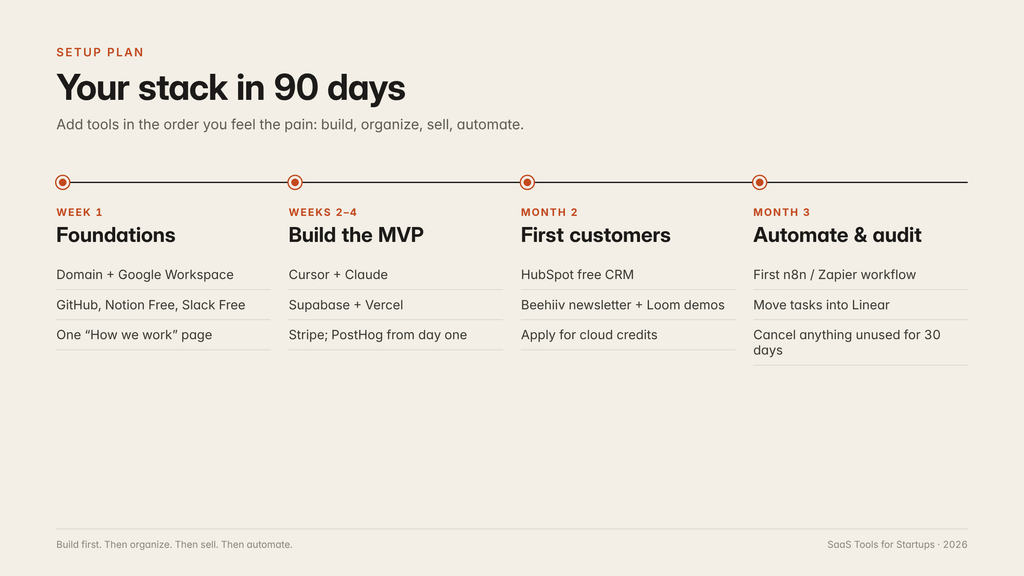
You can set up a lean stack of SaaS tools for startups in about 90 days by adding tools in the order you feel the pain: build first, then organize, then sell, then automate. Here’s a realistic timeline.
- Week 1: Foundations. Get a domain, Google Workspace email, GitHub, Notion Free, and Slack Free. Write one “How we work” page in Notion.
- Week 2–4: Build the MVP. Use Cursor and Claude to build, Supabase for your database, Vercel for hosting, and Stripe for payments. Add PostHog on day one so you collect data from your first user.
- Month 2: First customers. Set up the HubSpot free CRM, start a Beehiiv newsletter, and record Loom demos for prospects. Apply for AWS or Google Cloud credits once you have a live product.
- Month 3: Automate and audit. Build your first n8n or Zapier workflow, move tasks into Linear, and run your first SaaS audit. Cancel anything nobody opened in 30 days.
When you’re ready to grow the team, our breakdown of tech hiring covers what to look for in early engineers and how hiring has shifted with AI.
Mistakes Startups Make With SaaS Tools
The most common mistakes with SaaS tools for startups are buying before you need them, paying for duplicate tools, and ignoring usage-based bills until they explode. All three are fixable with a little discipline.
- Buying enterprise plans on day one. Four people don’t need SSO and audit logs.
- Two tools for one job. Notion and Confluence, Asana and Linear, three chat apps. Pick one and migrate.
- Ignoring AI usage costs. Seat prices look cheap, but premium AI models, agent credits, and API calls add up fast.
- No single owner for the stack. Someone must own admin access, billing, and offboarding.
Which SaaS Stack Should You Pick? 🤔
The right SaaS tools for startups depend on your team and product, not on what’s trending this week. Use this quick guide:
- Solo technical founder: Cursor, Claude, GitHub, Supabase, Vercel, Stripe, PostHog. Add Notion Free for notes. Total cost can stay near $40/month.
- Non-technical founder: Notion, Canva, HubSpot free CRM, Zapier, and an AI app builder or freelancer for the product. Spend on distribution, not dev tools.
- Small remote team (3–8): Slack Pro, Notion Plus, Linear Basic, Loom, Google Workspace. Async-first or burnout-first, your choice.
- Global team or customers: Add Deel for contracts, Wise Business for payments, and Xero for multi-currency accounting.
- AI-heavy product: Apply for Google for Startups or AWS Activate credits early, and track model costs per user from week one.
SaaS Red Flags to Avoid 🚩
If one of the SaaS tools for startups you’re eyeing promises to replace your whole team, or offers “lifetime access” for one small payment, read the fine print. Watch for:
- Lifetime deals from tiny vendors. Some are great, but many products stop updating or shut down within a couple of years.
- Year-one discounts with a hidden year-two jump. Always ask what you’ll pay after the promo ends.
- AI tools that charge per action without spending caps. Usage pricing without limits is a surprise bill waiting to happen.
FAQ
What are the best SaaS tools for startups in 2026?
The best SaaS tools for startups in 2026 cover seven jobs: Cursor and GitHub for building, Notion and Linear for planning, Slack for communication, HubSpot for sales, PostHog for analytics, Stripe for payments, and n8n or Zapier for automation. Most offer free tiers, so early teams can start at little or no cost.
Which free SaaS tools are good enough for an early-stage startup?
Free SaaS tools for startups like Notion, Linear, Slack, GitHub, Vercel, Supabase, the HubSpot free CRM, and PostHog can carry a small team for months. Expect to upgrade when you hit limits like Slack’s 90-day message history or Linear’s 250-issue cap.
How much does a startup software stack cost per month?
A solo founder can run a capable stack for roughly $40–80 per month by leaning on free tiers. A 5-person team at the first-customers stage often lands around $250–400 per month before usage charges. Costs depend on seats, billing cycle, and AI usage.
Are startup credits from AWS and Google Cloud really free?
Yes, they are promotional credits that don’t cost equity, but they come with eligibility rules and expiry dates. AWS Activate starts at $1,000 for self-funded startups, and Google’s program offers up to $350,000 for AI-first startups. Plan for full pricing once credits run out.
What is the best project management tool for startups?
Linear is a top pick for software teams because it’s fast and built for product workflows. Notion works better if you want docs, wikis, and simple task tracking in one place. Small teams should pick one rather than paying for both.
Should startups pay monthly or annually for SaaS?
Pay monthly while you’re still testing SaaS tools for startups, then switch to annual once your team has used it steadily for about three months. Annual billing usually saves around 15–20%, but it locks you in, which hurts if you pivot.
What is SaaS sprawl and how do startups avoid it?
SaaS sprawl is when a company collects overlapping subscriptions, unused seats, and forgotten tools that quietly drain cash. Avoid it by limiting your SaaS tools for startups to one per job, giving one person ownership of billing, and running a short audit every quarter.
Do startups still need SaaS tools if AI agents can do the work?
Yes. AI agents still need SaaS tools for startups to work inside, like a CRM, a database, a payment processor, and a task tracker. AI makes each tool more powerful, but it doesn’t replace the need for a reliable source of truth for your business.
Build Lean, Upgrade on Pain 🔥
The best SaaS tools for startups aren’t the trendiest ones. They’re the ones that each own a clear job, scale with your growth, and let you leave when you need to. Start on free tiers, claim your credits, watch for the credit cliff, and audit every quarter.
Your next step: open a spreadsheet today and list every one of your SaaS tools for startups, who uses it, and what job it does. Anything without an owner and a job gets cancelled this week. Lean stack, longer runway, no cap.
Leave a comment