
Imagine an AI that keeps working on your projects after you close the laptop. That is the pitch behind ChatGPT Dots, the always-on agents OpenAI launched on September 29, 2026. 🚀
Big claim, so let’s separate what is real from what is marketing. This guide covers what a dot actually does, who can get one, what it costs in dollars, where it can break, and how to set one up without handing over the keys to your whole digital life.
What Are ChatGPT Dots?
ChatGPT Dots are always-on AI agents inside ChatGPT. Each dot runs on GPT-6 Astra, gets its own cloud computer and browser, connects to apps through plugins, and keeps making progress on your goals between conversations instead of waiting for your next prompt. 🤖
Here is the easy way to picture it. A normal chat is you asking a question and getting an answer. A dot is you handing over a standing job, like “watch my customer feedback and prepare fixes,” and checking in when it has something to show you.
Every eligible user starts with one primary dot that you can name and make your own. Teams of dots working together are a stated future direction, and specialist dots with their own identity and access are starting as enterprise pilots. OpenAI’s early testing covered procurement, invoice processing, email marketing, customer support, and contracting.
One launch example shows the idea. An early tester’s dot noticed he had forgotten to invoice a publication, prepared the invoice, and sent it only after he approved. The approval step is the part to remember.
How Do ChatGPT Dots Work?
A dot works like a remote teammate with its own laptop. You give it a goal, it uses its cloud computer and the apps you connected to do the steps, and it messages you when it needs a decision or has something to review.

Every dot has its own cloud computer and browser, and you can open that computer any time to inspect its work. Your own computer stays separate unless you choose to connect it, which lets the dot use local files and tools next to you.
Through ChatGPT’s plugin system, a dot can reach more than 4,000 apps. You can talk to it in ChatGPT on desktop, web, and mobile, by voice call, or in Slack and Teams. Context follows it across channels, so a project started in ChatGPT can carry on in Slack without a fresh briefing.
Dots also learn from feedback. A dot can receive memories and recent context from ChatGPT, so the more you correct it, the closer its work gets to how you like things done.
What Is Proactive Research?
Proactive research is how a dot looks for ways to help when you are not chatting. It reads information from the apps you connected using read-only tools, then saves private notes. During that research it cannot send messages, change app content, or control a browser or computer.
OpenAI enforces that limit in code rather than just promising it, which is lowkey one of the smarter design choices here. Any follow-up action still has to pass the normal approval rules.
Do Dots Replace ChatGPT Work and Codex?
No. A dot can start and manage tasks in Codex or ChatGPT Work, but those stay separate tools for deeper jobs. Tasks you hand to them count toward your usage limits as usual, while plain conversations with your dot do not.
What Can ChatGPT Dots Actually Do?
Dots are best at repeating, multi-step work that spans several apps, like triaging feedback, updating documents when facts change, and preparing drafts for your approval. They are built to prepare work for your review, not to make final calls for you.
OpenAI’s own examples cover five jobs:
- A developer’s dot watches customer feedback, builds and tests small fixes, and returns pull requests with videos of the changes.
- A product lead’s dot revises launch materials when the scope changes and leaves drafts for review.
- A scientist’s dot reruns analyses as new data arrives and flags what needs attention.
- A sales lead’s dot checks customer requirements against product docs, builds a proof of concept, and updates the proposal.
- A creator’s dot turns a new interview transcript into clip ideas, show notes, and social drafts for approval.
For students and freelancers, the realistic starting jobs are smaller. Think weekly research summaries, sorting client messages into a task list, or drafting replies that you approve before anything is sent. If you are building a client base, pair that with a strong Fiverr profile as a CS student so the time a dot saves goes toward paid work.
Developers can use a dot to prepare scaffolding and drafts, but proof of skill still has to come from you. Our guide on building a developer portfolio with no experience is the place to start.
How Much Do ChatGPT Dots Cost?
Your first dot is included in Pro or Business Premium at no extra cost, so the real price is the plan. At launch, Pro tiers start at $100 per month and a Business Premium seat is $125 per month, or $100 per month billed annually. 💸
| Plan | Launch price | Dot included? |
|---|---|---|
| Plus | $20 per month | No |
| Pro 100 | $100 per month | Yes |
| Pro 200 | $200 per month | Yes |
| Pro 500 | $500 per month | Yes |
| Business Premium seat | $125 per month ($100 billed annually) | Yes |
Prices come from launch-week listings, so confirm them on OpenAI’s ChatGPT pricing page before you pay. A Business workspace also needs at least two paid seats.
Usage works in your favor at first. Conversations with your dot do not count toward ChatGPT usage limits, and your plan includes an allowance for deeper work with extended limits for the first month after launch. Later, you will be able to add more dots and scale each dot’s speed or monthly output.
Here is the math to run before upgrading, and it is illustrative, not a promise. If you value your time at $20 an hour, a $100 plan breaks even at 5 saved hours per month. If you have to fix the dot’s work heavily, those hours disappear fast.
Students should be extra careful. Plus does not include a dot, so getting one means paying five times the $20 Plus price before you have recurring work to hand over. Read our guide on how to earn $500 a month as a student first and let income pay for the tools, fr.
Who Can Use ChatGPT Dots Right Now?
At launch, dots are available to Pro and Business Premium users in eligible markets, and Enterprise, Edu, and Healthcare workspaces can try a beta once an admin turns it on. Users under 18 cannot use dots.
Rollout is gradual, so your account may need a few days to show the option. Pro excludes the European Economic Area, Switzerland, and the UK for now, while Business Premium is open across all supported ChatGPT regions. OpenAI keeps the details on its dots availability and limits page.
You create your first dot in the ChatGPT desktop app or a desktop browser, because setup does not work from mobile. After that, you can message it from the mobile app. Texting your dot is a limited beta for US Pro users only at launch.
How to Set Up ChatGPT Dots, Step by Step
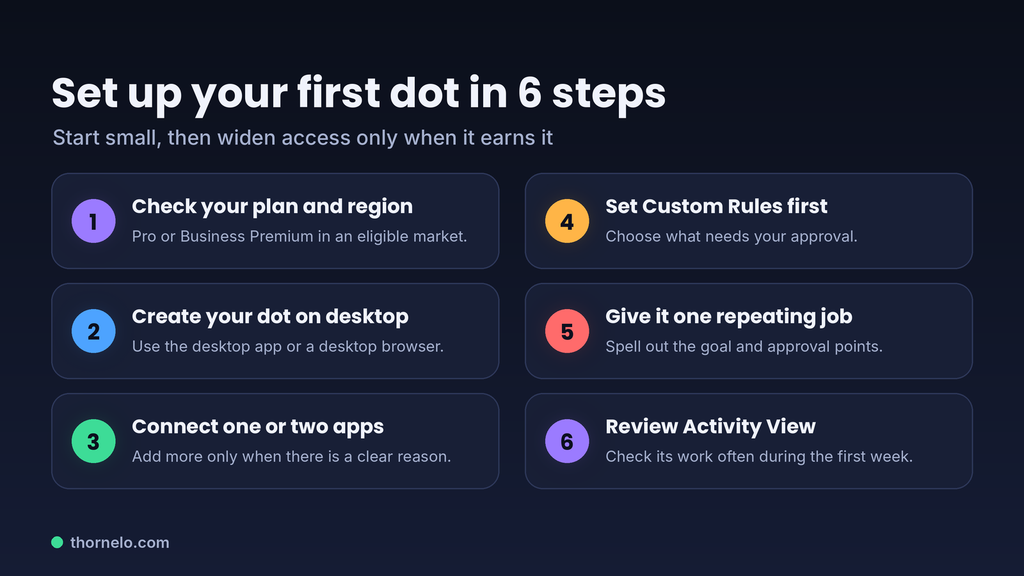
Create your first dot in the ChatGPT desktop app or a desktop browser, connect only the apps it needs, set Custom Rules, and give it one clear job. Here is the order that keeps risk low.
- Check access. Confirm you are on Pro or a Business Premium seat in an eligible market, or that your workspace admin enabled the Enterprise beta.
- Create and name your dot. Start the dot setup on desktop and let it introduce itself. A name makes it easier to refer to in Slack or Teams later.
- Connect the minimum apps. Start with one or two. Plugin permissions are shared across dots, ChatGPT, ChatGPT Work, and Codex, and you manage them in the Plugins tab.
- Set Custom Rules before the first task. Decide what your dot can do alone, what needs your approval, and what is off limits, such as “never send emails.”
- Hand over one repeating job. Be specific about the goal, the sources, and the approval points.
- Watch Activity View for the first week. Check what it did, correct misunderstandings, and redirect or stop work when needed.
A starter instruction you can adapt: “Every Friday, scan the AI newsletters I forward you, pick the three biggest launches, and draft a short summary of each with the original link. Do not publish or email anything. Leave drafts for me to review.”
Pro tip: write your approvals like a contract. Approving one message does not give your dot ongoing permission, and any advance approval stays limited to what you spelled out. Say who it can contact, what it can say, and under which conditions. 🔥
How Do ChatGPT Dots Keep You in Control?
Dots use layers: Custom Rules you set, a separate Auto-review check before risky actions, Activity View to follow the work, and hard limits that hand sensitive steps like password changes and money transfers back to you.
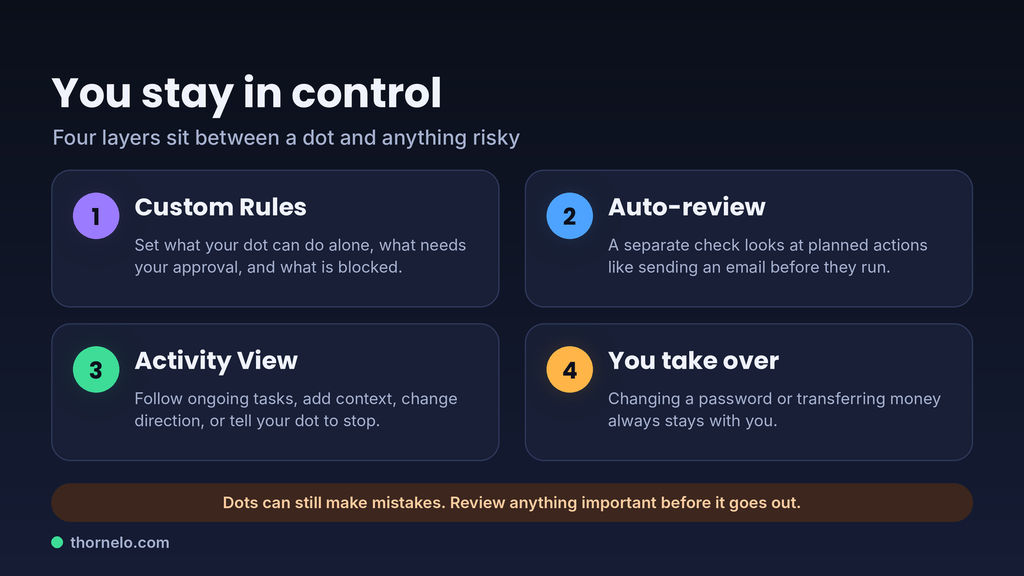
Some actions need your approval each time, including permanently deleting data and installing software. Purchases with a card saved on a merchant’s website also need your approval, and you can give that approval in advance only when it covers the specific purchase. If a safety monitor spots a concern, it can pause the dot’s work and show you a warning.
For supported sign-ins, your dot pauses while you type credentials into a secure form that sends them straight to the browser environment, so the model never sees them. That protection does not cover passwords you paste into a chat or a document.
Prompt injection is the big risk to watch. A web page, email, or document can hide instructions that try to trick an agent, and dots are built to treat that content as data rather than as commands. OpenAI says these protections reduce the risk but do not remove it, so no cap, keep your Custom Rules tight.
Privacy deserves a clear look too. On personal plans, your “Improve the model for everyone” setting decides if your dot’s conversations and work may help train models, while Business, Enterprise, and Edu workspaces are not used for training by default. Limited human review can still happen in safety-related cases, even with training turned off.
You also cannot view or edit individual dot memories right now. You can only reset or delete the dot, so keep sensitive details out of chats you might regret later. Turn on multi-factor authentication in your ChatGPT security settings, and read OpenAI’s dots privacy, security, and safety FAQs and its safety write-up for dots before connecting email or cloud drives.
ChatGPT Dots vs Regular ChatGPT: Which One Should You Pick?
Pick regular ChatGPT for quick questions, ChatGPT Work or Codex for one big task, and a dot when you want a named helper that remembers context and keeps moving across days. If the work does not repeat, a dot is probably overkill.
- Student on Plus or lower: stay put. A dot needs Pro or a Business Premium seat, and $100 is hard to justify before you have recurring work.
- Freelancer or creator with repeating admin: try one month of Pro with strict Custom Rules, and track the hours saved against the $100 break-even above.
- Developer: use the dot as a manager that hands scoped jobs to Codex, and review every pull request yourself.
- Team lead: ask your admin about Business Premium seats or the Enterprise beta before anyone connects shared inboxes.
- Privacy-first user: connect fewer apps, or skip dots until you are comfortable with how memory works.
Reality Check: Limits and Red Flags of ChatGPT Dots
Dots are early. You get one primary dot, it can make mistakes even when it follows your rules, and some actions cannot be undone, so treat it as a fast helper whose work you review, not an autopilot.
A few launch limits are worth knowing. A dot cannot call you first and has no standalone email address, though it can use your connected personal email. Access to your own computer is off by default, and reversing an action depends on the app involved.
Hype follows every launch like this, so watch for red flags. Sites selling “dot access,” “free dots,” or prompt packs that promise passive income are not OpenAI, and dots come only through ChatGPT on eligible plans. Nobody can honestly guarantee what a dot will earn you, and nobody should ever ask for your password or API keys.
For the bigger picture on money and AI, see our post on making money in the AI era. If you are curious where always-on agents might lead, what AI will actually do to humanity in 2029 is a good next read.
ChatGPT Dots FAQ
Dots are paid, early, and limited to certain plans and regions, and the answers below cover what most people want to check first.
Is ChatGPT Dots free?
No. Your first dot is included at no extra cost in a Pro or Business Premium plan, but those plans are paid. Free, Go, and Plus do not include dots.
Can I get ChatGPT Dots on the Plus plan?
Not at launch. Dots are limited to Pro, Business Premium, and Enterprise beta workspaces. OpenAI says it plans to expand dots to more users soon, but it has not given a date.
What model powers ChatGPT Dots?
Dots run on GPT-6 Astra, which OpenAI calls its most capable and aligned model. Each dot also gets its own cloud computer, a browser, and access to apps through plugins.
Are ChatGPT Dots safe to use?
They include several safeguards, such as Custom Rules, Auto-review, secure sign-in, and monitoring that can pause work. OpenAI also says dots can make mistakes and that no protection fully removes prompt injection risk. Review important work and connect only the apps you need.
Can ChatGPT Dots access my computer?
Only if you connect it. Your computer stays separate from the dot’s cloud computer by default, and local access stays off until you enable it in the desktop app. Camera, microphone, and screen access also need permission in your device settings.
Can ChatGPT Dots send emails or spend money without asking?
Not freely. Sensitive steps like changing a password or transferring money always come back to you, and purchases on saved merchant cards need your approval. For routine actions such as recurring messages, you can set Custom Rules or give specific advance approval.
How many ChatGPT Dots can I have?
One primary dot for now. OpenAI says you will be able to add more dots later and scale each one’s speed or monthly work. Teams of dots working together are described as a longer-term goal.
Conclusion: Are ChatGPT Dots Worth It in 2026?
ChatGPT Dots are the first mainstream always-on agent inside ChatGPT, and that is a real shift from asking questions to delegating work. They are also early, priced for power users, and best treated as a helper you supervise.
Your next step is simple. Write down one repeating task you would hand to a dot, then price it: hours saved per month times your hourly rate. If the number beats $100, trial a dot for a month with minimal app access and strict Custom Rules, and use the extended limits in that first month to test it properly.
This article is educational and not financial or professional advice.
Leave a comment